
Last updated on
Nov 6, 2026
Get the free Weekly Planner Worksheet
We are not affiliated with any brand or entity on this form

Fill out
Complete the form online in a simple drag-and-drop editor.

eSign
Add your legally binding signature or send the form for signing.

Share
Share the form via a link, letting anyone fill it out from any device.

Export
Download, print, email, or move the form to your cloud storage.
Why pdfFiller is the best tool for your documents and forms


End-to-end document management
From editing and signing to collaboration and tracking, pdfFiller has everything you need to get your documents done quickly and efficiently.
Accessible from anywhere
pdfFiller is fully cloud-based. This means you can edit, sign, and share documents from anywhere using your computer, smartphone, or tablet.
Secure and compliant
pdfFiller lets you securely manage documents following global laws like ESIGN, CCPA, and GDPR. It's also HIPAA and SOC 2 compliant.
What is Weekly Planner
The Weekly Planner Worksheet is a personal planning template used by individuals to organize their weekly activities effectively.
pdfFiller scores top ratings on review platforms




I run a business, and sometimes PDF Filler is the perfect solution to fill that gap in my standard software. Works great!
It is very good, easy to work with, and has solid features making this an excellent choice to work with online .pdf forms.
Who needs Weekly Planner?
Explore how professionals across industries use pdfFiller.

Weekly Planner is needed by:
-
Students looking to manage their study schedules
-
Professionals needing to plan their workweek
-
Parents wanting to coordinate family activities
-
Freelancers tracking project deadlines
-
Anyone seeking better time management
Comprehensive Guide to Weekly Planner
What is the Weekly Planner Worksheet?
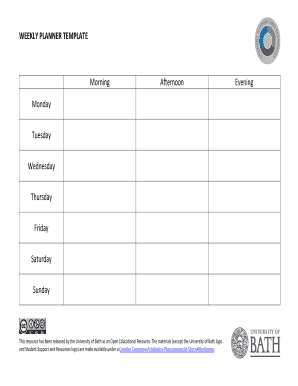
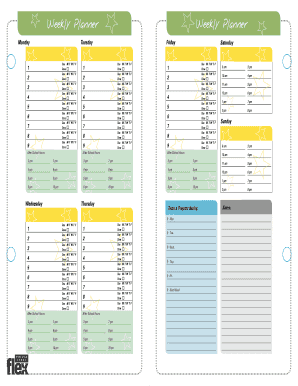
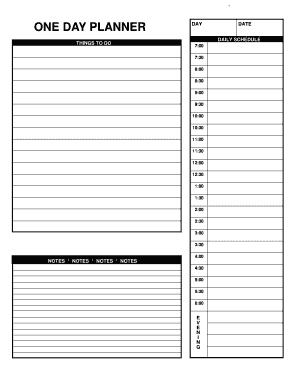
The Weekly Planner Worksheet is a customizable template designed for organizing your weekly schedule effectively. It features a grid layout divided into morning, afternoon, and evening sections, allowing users to allocate their time efficiently. Each section is created to help users visualize their daily tasks, making planning easier and more structured. It is also photocopiable, providing flexibility for multiple uses, enhancing its practicality for various needs.
Purpose and Benefits of the Weekly Planner Worksheet
This worksheet serves multiple purposes, primarily focused on improving time management and organization. By using the Weekly Planner Worksheet, individuals can track their activities, set priorities, and plan their weeks more effectively. It is particularly useful for budgeting purposes, enabling users to align their financial planning with their schedules and activities.
Key Features of the Weekly Planner Worksheet
The effectiveness of the Weekly Planner Worksheet is attributed to several key features. It includes:
-
A grid layout that offers a clear view of the week.
-
Fillable sections to customize activities according to individual needs.
-
Customization options, including photocopying for repeated use.
-
Ease of use suited for all ages and lifestyles.
Who Benefits from the Weekly Planner Worksheet?
The Weekly Planner Worksheet appeals to a diverse audience. It is beneficial for:
-
Students, to manage school assignments and deadlines.
-
Professionals, for planning work tasks and meetings.
-
Homemakers, to coordinate family schedules and activities.
Different lifestyles can adapt the worksheet to fit unique planning needs, enhancing its versatility and utility.
How to Fill Out the Weekly Planner Worksheet Online
Filling out the Weekly Planner Worksheet online is a straightforward process. Follow these steps:
-
Access the template through pdfFiller.
-
Fill in the grid with your activities for each day.
-
Save changes once you have completed the planning.
Utilizing digital features allows for easy editing and sharing, maximizing the effectiveness of your planning.
Common Mistakes and How to Avoid Them
When using the Weekly Planner Worksheet, users often make common mistakes that hinder effective planning. Common oversights include skipping sections or failing to allocate sufficient time for activities. To avoid these pitfalls:
-
Ensure all sections are filled out each week.
-
Review and adjust your weekly plan periodically.
These practices ensure a comprehensive weekly plan that adapts to changing needs.
How to Download and Save the Weekly Planner Worksheet PDF
Downloading and saving the Weekly Planner Worksheet PDF is necessary for continued use. To do this:
-
Access the PDF version of the worksheet.
-
Follow the prompts to save the document to your device.
-
Choose options for printing and digital storage.
Keeping a digital version is beneficial for quick access and modifications on the go.
Security and Privacy Considerations
When using pdfFiller for your Weekly Planner Worksheet, security and privacy are paramount. pdfFiller implements robust security measures such as:
-
256-bit encryption to protect your data.
-
Compliance with SOC 2 Type II, HIPAA, and GDPR standards.
These measures ensure that your sensitive information remains confidential while using the platform.
Maximize Your Weekly Planning with pdfFiller
Engaging with pdfFiller’s features significantly enhances your planning experience. This platform provides tools for editing and tracking progress, making it easier to adjust plans as needed. The user-friendly interface of pdfFiller allows for greater efficiency compared to traditional planning methods, encouraging users to adopt the Weekly Planner Worksheet in their routine.
How to fill out the Weekly Planner
-
1.Start by accessing the Weekly Planner Worksheet on pdfFiller. Navigate to the website and search for the form using the search bar.
-
2.Once you find the Worksheet, click on it to open the document in the pdfFiller interface.
-
3.Before filling out the form, gather necessary information such as appointments, work commitments, and personal tasks to include in your schedule.
-
4.Begin filling in the form by selecting the fields designated for each day of the week. Use the grid provided to outline your morning, afternoon, and evening activities.
-
5.You can easily navigate through the form using your mouse or keyboard. Click directly on the fields you want to fill in.
-
6.Ensure you update all sections to reflect your planned activities accurately. Consider color-coding or using bullet points to organize tasks for clarity.
-
7.Once you have entered all your information, review each section carefully to confirm it reflects your schedule correctly.
-
8.Finalize your form by saving any changes. Use the 'Save' button in pdfFiller to keep your updated schedule.
-
9.To download or print the completed Weekly Planner Worksheet, click the download icon and choose your preferred file format.
-
10.If you wish to submit the completed form, follow the submission process provided by pdfFiller, which may include sending it via email or directly through the platform.

Who can use the Weekly Planner Worksheet?
The Weekly Planner Worksheet is ideal for anyone looking to organize their weekly schedule, including students, professionals, parents, and freelancers.
Is there a deadline to submit the Weekly Planner Worksheet?
No specific deadlines apply as it is a personal planning tool. It's designed for ongoing use to plan out each week effectively.
How do I submit my completed Weekly Planner Worksheet?
You can submit your completed Weekly Planner Worksheet by either downloading it as a PDF or printing it directly from pdfFiller for physical submission.
What information do I need to fill out the form?
You should gather details on your appointments, tasks, work commitments, and any personal engagements to effectively fill out each section.
What common mistakes should I avoid when using the Weekly Planner Worksheet?
Common mistakes include not allocating enough time for each task, overlooking activities, or failing to review your schedule regularly for adjustments.
How long does it take to complete the Weekly Planner Worksheet?
Completing the Weekly Planner Worksheet may take anywhere from a few minutes to an hour, depending on the complexity and detail of your weekly schedule.
Can I make changes to the Weekly Planner Worksheet after saving?
Yes, you can reopen the saved Weekly Planner Worksheet at any time in pdfFiller to make updates or revisions as necessary.
Related Forms


Related Catalogs
Get the latest insights from our blog



If you believe that this page should be taken down, please follow our DMCA take down process
here
.
This form may include fields for payment information. Data entered in these fields is not covered by PCI DSS compliance.